Remote desktop has been one of the weaker areas of the transition to Wayland. There's a lot of software written exclusively for X that has a direct Wayland equivalent. Within KDE, we already have a Plasma-native RDP and VNC solution for Wayland, but we're aware that it hasn't yet reached the level we want it to.
Throughout the path to Plasma 6.8 it has been an area of focus, with contributions from me, Shouvik Kar, Nick Haghiri, Oliver Beard and Wensheng Tang.
Improved Unattended mode
There are a few different use cases for remote desktop:
Support Mode
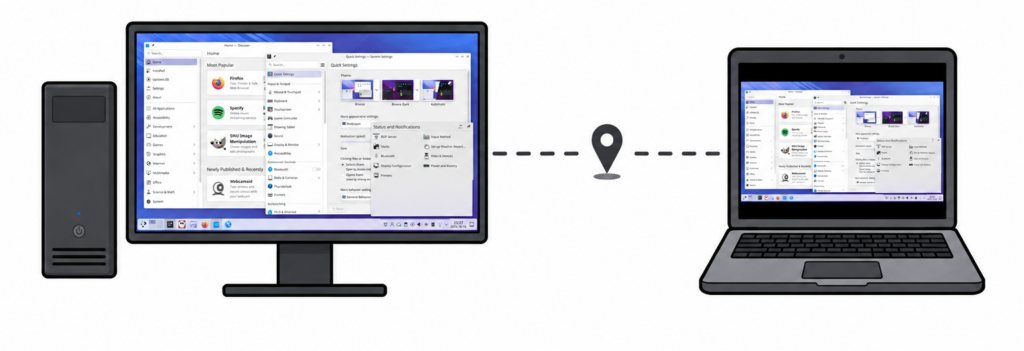
This is the typical remote session. You see exactly the same thing on the remote client as on the host, with the contents matching the size of the monitors on the host machine.
This is great when there's someone at the host machine and someone else remoting in, and you want to work together while both seeing the same content.
Unattended mode
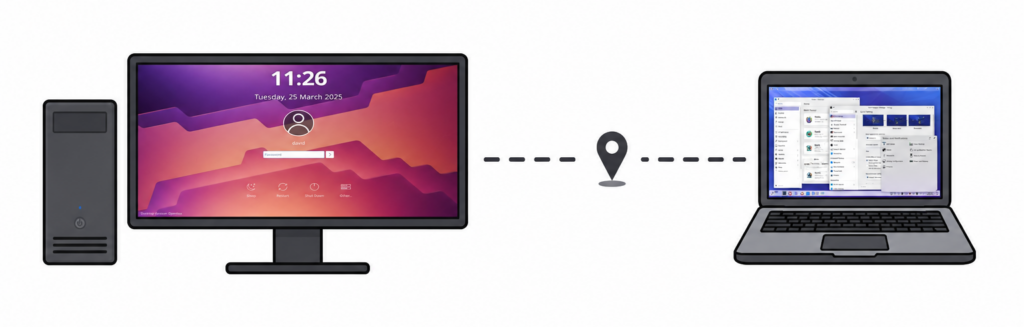
The above mode isn't so great when there's just you. If I'm connecting to my home PC from a tiny laptop, it's very unergonomic to have the remote screen be larger than my laptop display and have to scroll around it.
Additionally if my remote PC is in an office, I don't want my colleagues to see my cursor moving around clicking on windows when I'm not there.
We have a new UX that solves all of these issues:
- On connection, the remote machine shows the login screen.
- For the sesssion you log into, the host machine's screens are removed, ensuring privacy and security.
- The remote screens are resized to match the size and layout of the client's screen setup.
- When streaming in a window, the remote screen dynamically resizes to match the window size.
- Best of all, after the remote session is closed and the user logs back into the host machine, all their windows return to where they were last positioned on the host setup.
The underlying work also sets us up nicely for the full headless case.
Clipboard
Clipboard support has been massively improved with bi-directional text snippets and upcoming work for file transfers, including support in KRDC.
Performance
We've been cutting down latency throughout the system. A new timing mechanism tracks every frame throughout the entire process, letting us see where delays build up, from receiving the raw frame and encoding it, through transmission over the network, to rendering on the client and finally receiving the acknowledgement.
We now coalesce frames that are still waiting to be sent to the client. A new algorithm determines the optimal number of frames to keep in flight, while improved backpressure handling keeps latency lower during network dropouts.
There's also work happening to send multiple streams or even areas of the same desktop at once.
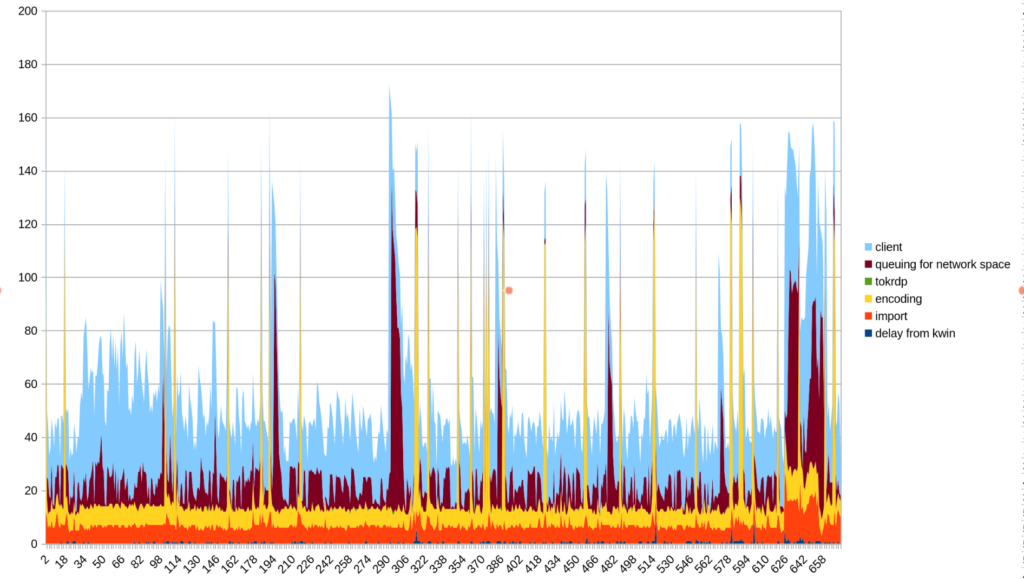
KRDC will also benefit from improved performance in 26.12 as an extra source of latency compared to the xfreerdp3's model performance has been addressed.
Better compatibility
One of the core reasons we have an RDP server is that there's a huge range of existing clients out there. That only helps if we actually support those clients, which isn't trivial given how much variation there is between them.
We now support both RemoteFX Progressive encoding as well as full hardware accelerated H264 encoding with improved fallback for when H264 encoding fails. We also fixed NLA authentication for Windows clients.
libei port
Another large refactor is the port to libei: a library/protocol for sending emulated input to the compositor that's a lot more fleshed-out than the basic 'move mouse' 'send keysym' that existed directly in the XDG Portal specification. libei is far more robust: it can support any number of devices at once and provides the infrastructure for us to also support remote tablet and touch.
We also have massively improved support throughout the stack for sending any keysym that isn't in the current keymap. i.e even if the host keyboard is set to US, you can still input on the remote side characters like ẞ, to even fully composed UTF-8 strings like "안녕 👋".
What's next
Multi-user headless
Whilst I am confident that we will have a great single-user story in time for Plasma 6.8 even for truly headless setups, it is unlikely we will deliver a remote server that handles multiple concurrent users at this time. It is far from trivial, and feature freeze for Plasma 6.8 is upon us.
Standardisation
Ultimately, it's frustrating that we're in a situation where we have to maintain this entire service at the KDE level, when much of it should be a solved and shared problem.
Having our own implementation has been useful to work out how to provide tight integration with Plasma, but there are many competing remote-desktop services that should be able to benefit from the same underlying infrastructure.
Others feel the same way, and there is some effort to start standardising the work for headless setups. I hope to have more news on that front shortly.
Call to action
As this remains a critical path for X11 holdouts, we need people to test and contribute. If you can, please run master builds and report any bugs you find. The final merge-requests for the parts mentioned above should be landing soon. Bug reports help; patches even more so!